Car Blueprint Generator: Four-View Car Blueprints
Describe a generic car by body style and proportions and AI draws a car blueprint: side, front, rear and top views at one scale, from 60 credits. It is a CAD-style PNG. The free layout sheet below draws exact car blueprints from your numbers, as PDF, SVG or DXF.
- Side, front, rear, top
- Your wheelbase and sizes
- Free layout sheet
- Generic vehicles only
Drawing style
Blueprint
White lines on blue, like a classic print.
You get a CAD-style PNG made by AI, not an editable CAD file. Trace it to DXF for free afterwards.
Generic sedan, four views
Drawn with the free layout sheet below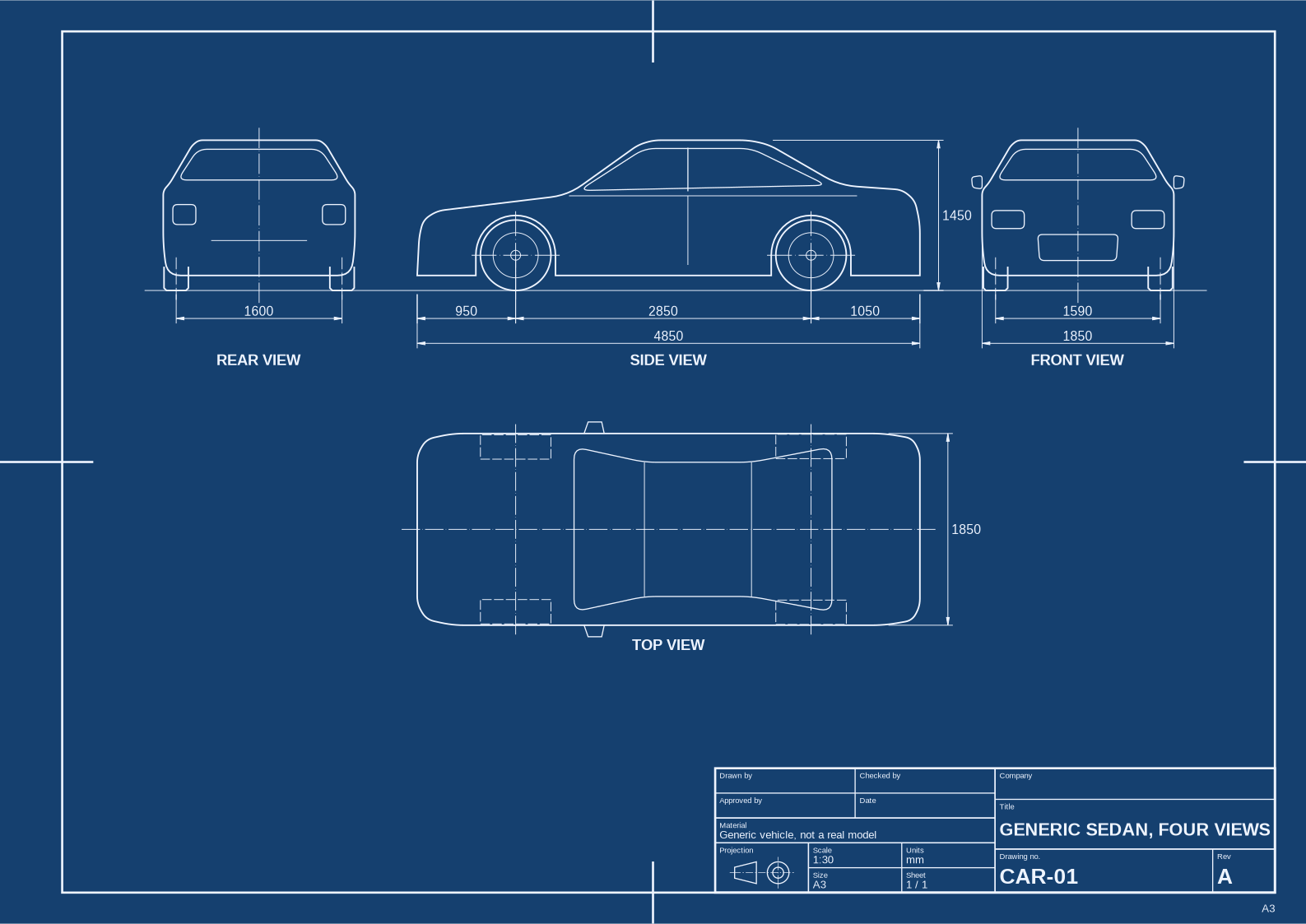
Prompt idea: Car blueprint of a generic four-door sedan: side, front, rear and top views at one scale on a shared ground line, length 4850 mm, wheelbase 2850 mm, height 1450 mm, width 1850 mm, no logos. Your result will differ.
Free layout sheet
Four-view car blueprints from your numbers
Pick a body style, type the length, wheelbase, overhang, height, width and track, and the sheet redraws every view at one scale with its dimension lines. It runs in your browser and saves a true-size PDF, SVG, DXF or PNG.
Rear overhang 1050 mm
A3 420 × 297 mm · scale 1:30
Generic vehicle · drawn in your browserExamples
Car blueprints drawn with the layout sheet
Six sheets made with the free tool above, straight from its presets. The silhouettes are simplified on purpose: they are a measured frame for your own design, not any real vehicle.
Free layout sheet
Sedan, first angle
Rear, side and front views on one ground line, the top view below, A3 at 1:30, dimensions in millimetres.
Free layout sheet
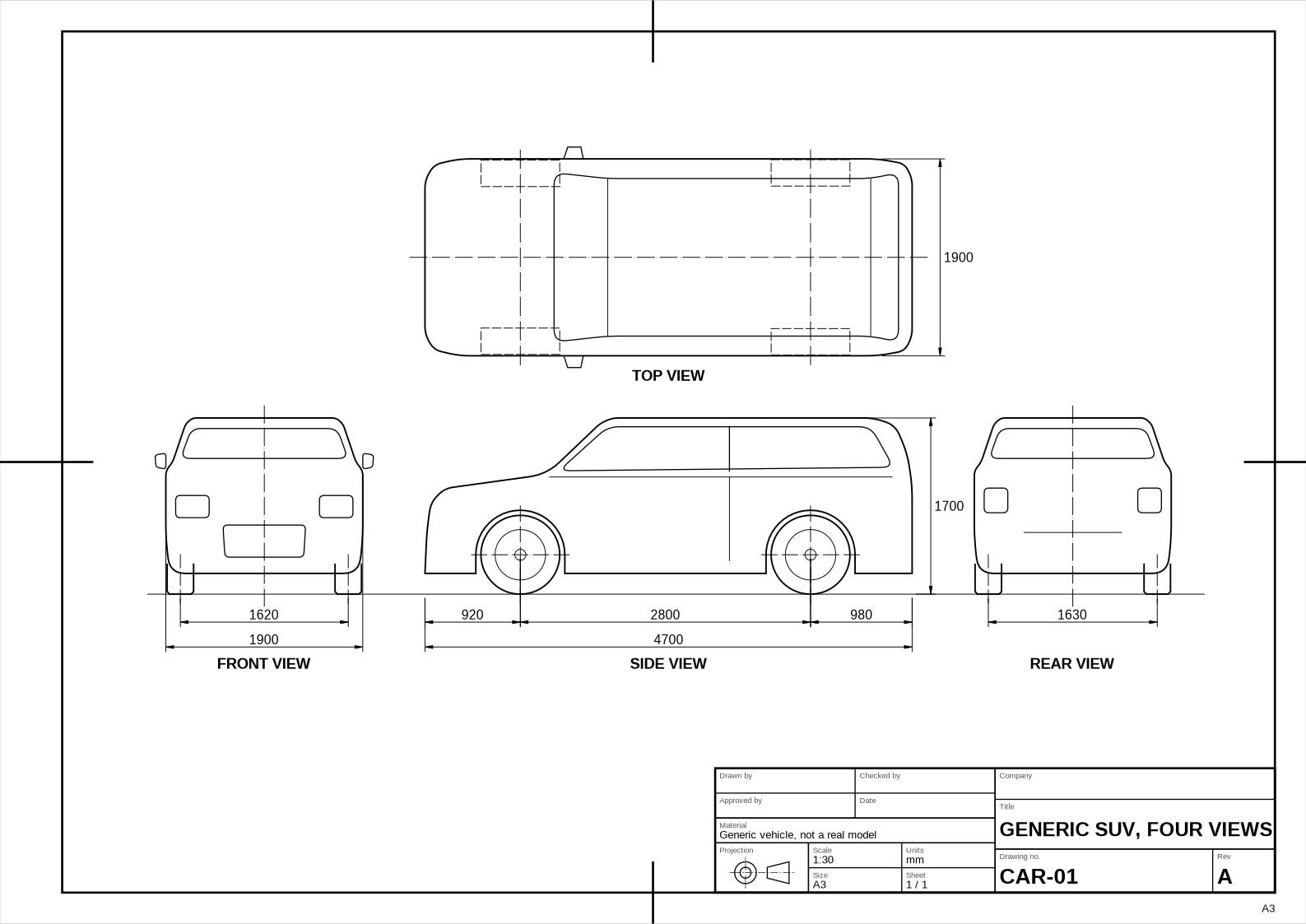
SUV, third angle
The CAD drawing look in black on white, with the top view above the side view and the front view on the left.
Free layout sheet
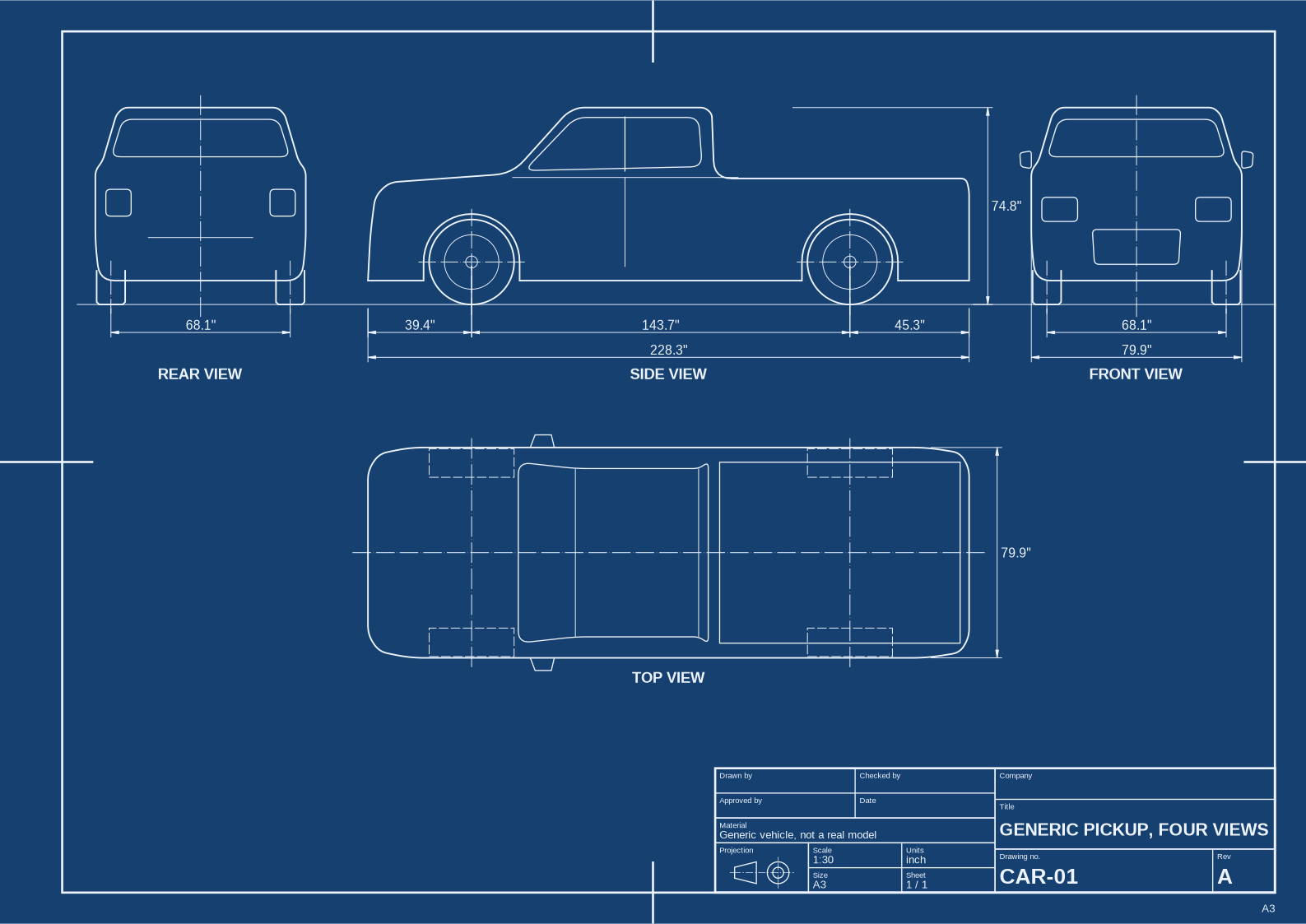
Crew-cab pickup in inches
Length, wheelbase, overhangs, height, width and both tracks written in inches; the bed shows in the top view.
Free layout sheet
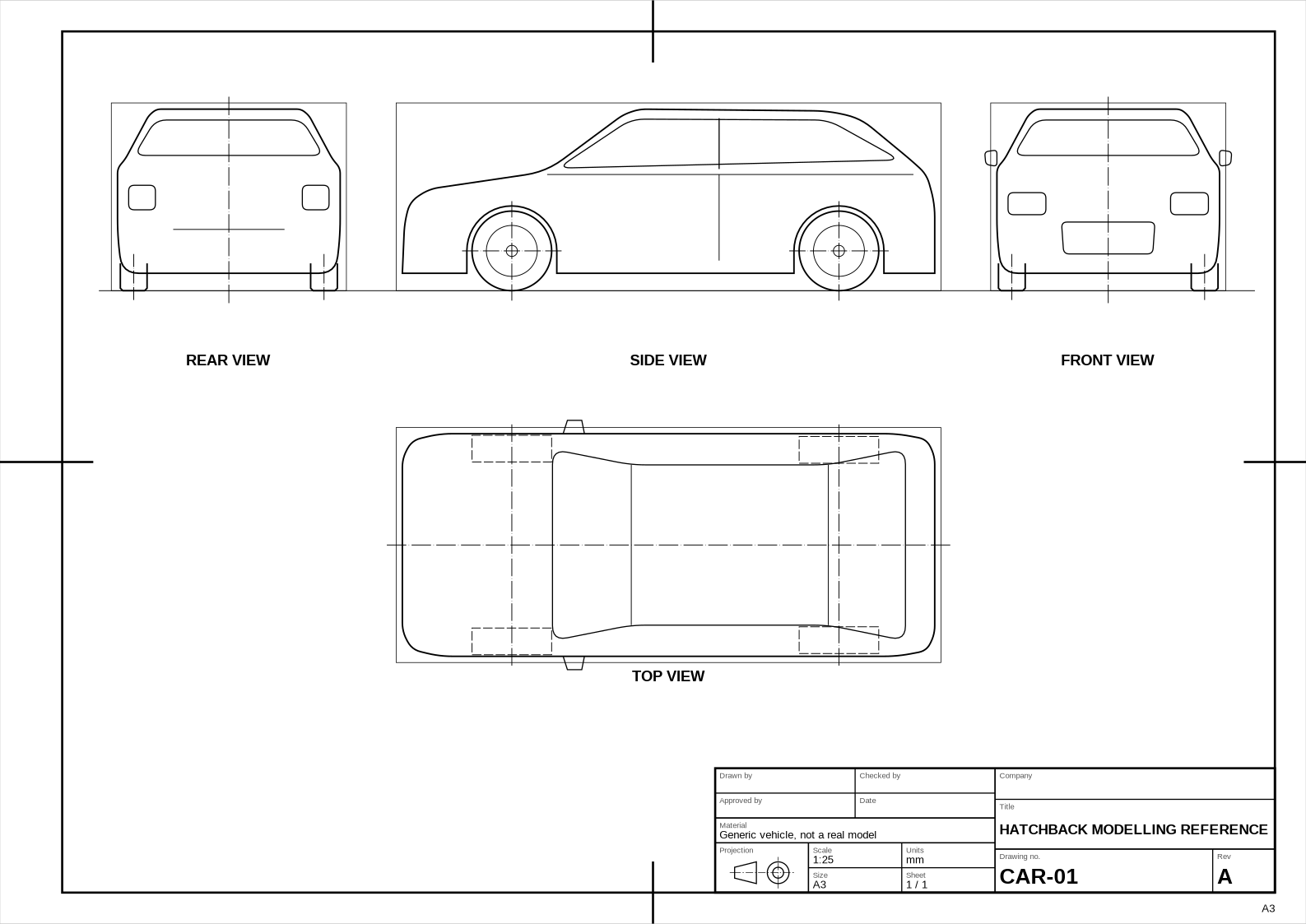
Hatchback modelling reference
Dimension lines off and view frames on: four boxes at one scale to line up reference images in a 3D app.
Free layout sheet
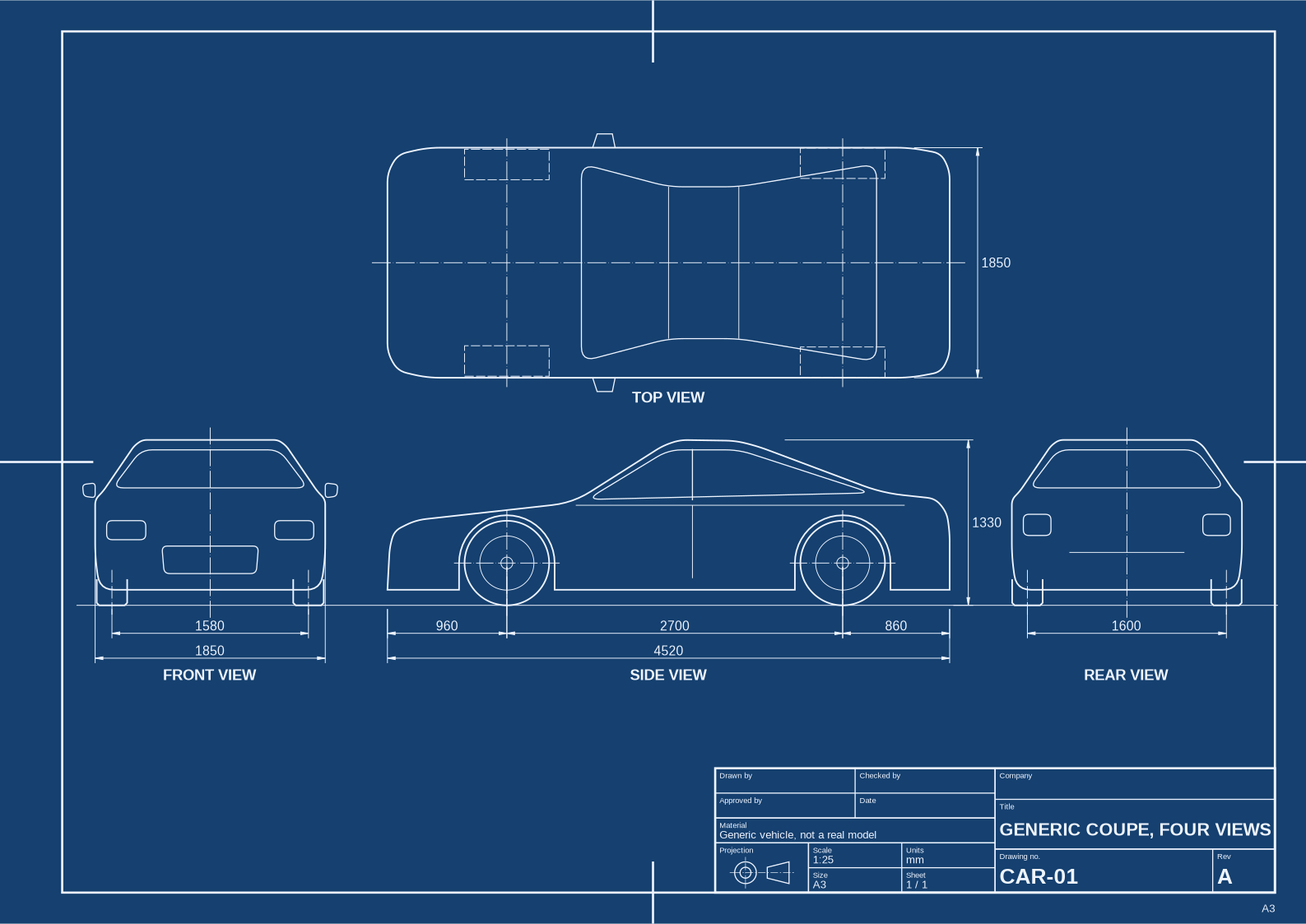
Coupe at 1:25
A shorter car fits A3 at the next larger scale; the scale in the title block updates by itself.
Free layout sheet
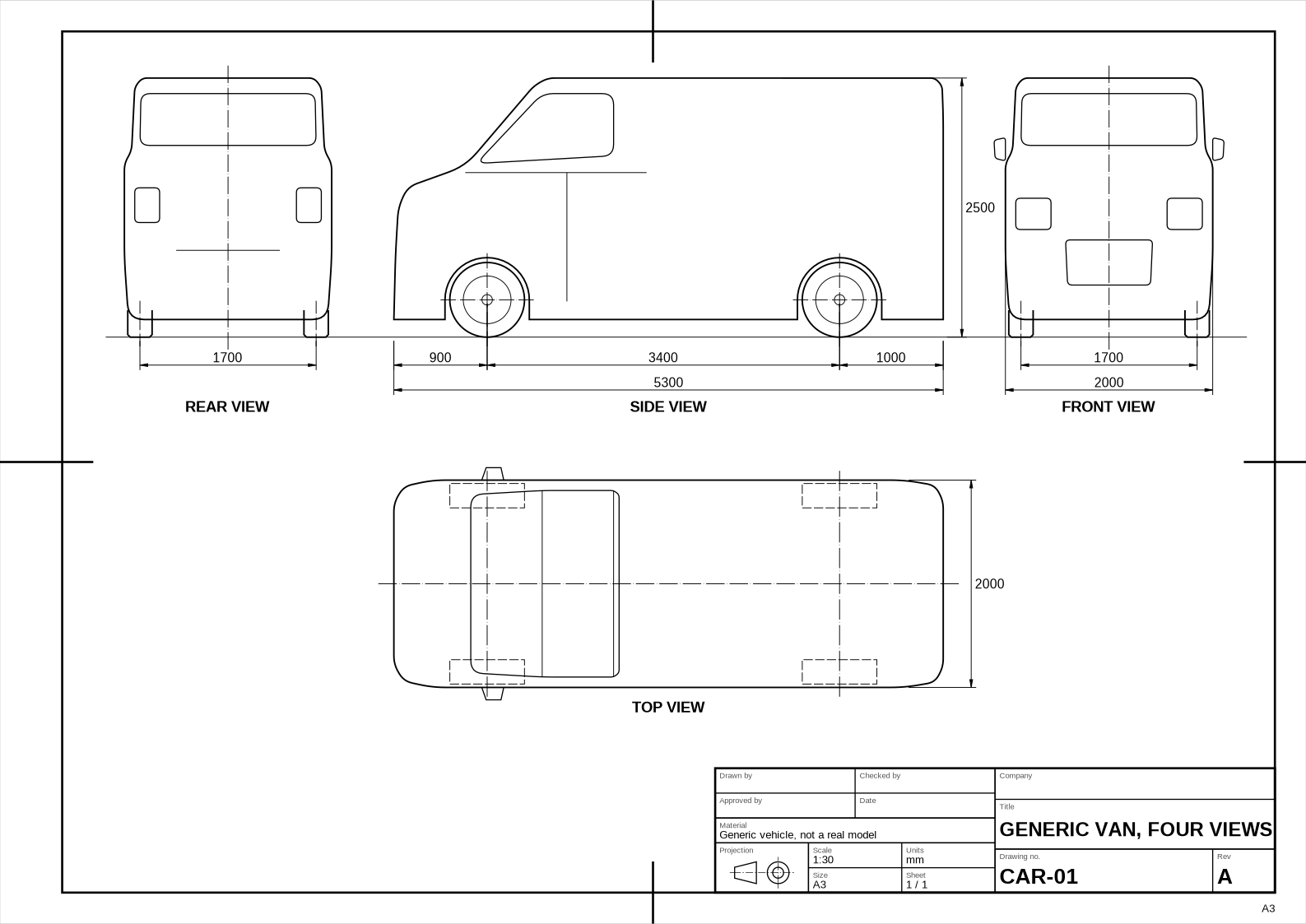
High-roof van
A tall body still fits: the sheet picks the largest scale that holds all four views above the title block.
Prompt builder
Set up a car blueprint generator prompt
Choose the body style, proportions, design era, views, sheet look and dimensions. Apply sends one clear prompt to the AI generator above and keeps every vehicle generic.
Generated prompt
BlueprintStart from a template
Read the sheet
How car blueprints are laid out
Designers, modellers and students use car blueprints to study proportions or to build a model on top of them. They work only when the views agree, so a few rules matter.
Sedan from our free layout sheet, first angle
How to
How to make car blueprints in 3 steps
With the AI car blueprint generator at the top, or the free layout sheet if you need exact numbers.
STEP 1
Describe a generic car
Name the body style and proportions, not a brand, or switch to the Sketch tab and drop your own drawing (PNG, JPG or WebP up to 10 MB).
STEP 2
Keep a wide sheet
Leave the Blueprint style and the 3:2 sheet so the side view fits above the others. Use 2K for four views.
STEP 3
Generate and check
Press Generate drawing (60 credits at 1K, 80 at 2K). Compare the top view with the side view, then Download PNG or Convert to DXF.
Proportions, not brands
Say "long hood, short deck, low roof" instead of a model name.
Name the views
Ask for side, front, rear and top views on one ground line.
Need exact sizes?
Type them into the layout sheet; its dimensions are your numbers.
For modelling
Ask for clean line art without text, or use view frames.
Two tools
Car blueprint generator or the free layout sheet
One imagines a vehicle from words, the other draws a measured frame from your numbers.
- AI input
- A description of a generic vehicle, or a sketch or photo
- AI output
- A CAD-style PNG in the Blueprint, line or CAD look, at 1K or 2K
- AI cost
- 60 credits at 1K, 80 at 2K; refunded automatically if a run fails
- AI accuracy
- Proportions look right; views may disagree and numbers are illustrative
- Layout input
- Six generic body styles and ten dimensions in mm or inches
- Layout output
- Vector PDF at true size, SVG, DXF R12 with layers, PNG at 150 dpi
- Layout sheets
- A4, A3, A2, ANSI B or ANSI C; the largest scale that fits is chosen
- Layout cost
- Free, no account; runs in your browser and uploads nothing
It does
- Draw a generic car blueprint from a prompt or a sketch (AI)
- Lay out side, front, rear and top views at one scale
- Dimension length, wheelbase, overhangs, height, width and track
- Place views in first or third angle with the right symbol
- Save the sheet as PDF, SVG, DXF or PNG
It does not
- Draw real makes or models, logos or badges
- Model body surfaces: the layout silhouettes are generic
- Make a 3D model of the car
- Promise that AI dimension values are right
- Turn the AI PNG into an editable CAD file by itself
Car blueprints FAQ
The layout sheet, the AI generator and car blueprint basics.
What are car blueprints?
Car blueprints are orthographic views of a vehicle, usually side, front, rear and top, drawn at one scale and lined up with each other. They show proportions and main sizes, and modellers use them as reference images.
Which views should a car blueprint include?
Side, front, rear and top are the standard set. Add an underside view if you model the floor, or a section if you need the seating and drivetrain package.
Can I get car blueprints of a specific make and model?
No. Both tools draw generic vehicles only. Real cars are protected designs and trademarks, and a generated picture could not reproduce their real dimensions anyway. Use the maker’s official drawings or a licensed source for a real car.
How do I use car blueprints for 3D modelling?
In the layout sheet, turn dimension lines off and view frames on, then download PNG or SVG. Crop each frame onto its own plane in Blender or your CAD tool and scale it so the wheelbase matches.
Is the result a car CAD drawing I can edit?
The layout sheet gives a real DXF with layers for the outline, hidden wheels, centre lines and dimensions. The AI generator gives a PNG; Convert to DXF under the result traces its lines for free.
Are the dimensions real?
On the layout sheet they are exactly the numbers you type, drawn to scale. On AI car blueprints they are illustrative, so replace them with your own design values.
What do wheelbase, overhang and track mean?
Wheelbase is the distance between the front and rear wheel centres. Overhangs are the body length ahead of the front axle and behind the rear axle. Track is the distance between the left and right wheel centres on one axle.
First angle or third angle for car blueprints?
Either works if the sheet says which. First angle, common in Europe, puts the top view below the side view; third angle, common in the US, puts it above. The layout sheet switches with one click and updates the symbol.
What scale does the layout sheet use?
The largest scale that fits all four views above the title block: a 4.85 m sedan fits A3 at 1:30 and A2 at 1:20. The scale is printed in the title block, and the PDF prints at true size.
Is the car blueprint generator free?
The layout sheet is free with no account. The AI car blueprint generator uses credits, 60 at 1K or 80 at 2K, and a failed run is refunded automatically.
Can I draw a pickup, SUV or van?
Yes. The layout sheet has sedan, hatchback, SUV, pickup, coupe and van presets you can resize. The AI generator takes any generic vehicle you describe, from a roadster to a bus.
Does the layout sheet upload anything?
No. It builds the drawing in your browser and saves the files from there. The AI generator does send your prompt or sketch to our server to make the image.
Draw car blueprints of your own design
Describe a generic car and generate, or set exact sizes in the free layout sheet. Credits come back if a run fails.
Describe a car