Drone Frame Design: Planner and CAD Drawings
Start your drone frame design from the props: pick X, H, plus or hex, set prop size and arm width, and the planner finds the wheelbase, places motor and stack holes, and draws a dimensioned sheet plus a 1:1 cut DXF. Or describe a frame and AI draws a CAD-style picture.
- Wheelbase from props
- Motor and stack holes
- Dimensioned top view
- Free 1:1 cut DXF
Drawing style
Technical
Full sheet: views, a section, notes and a title block.
You get a CAD-style PNG made by AI, not an editable CAD file. Trace it to DXF for free afterwards.
X frame, top view sheet
AI-generated example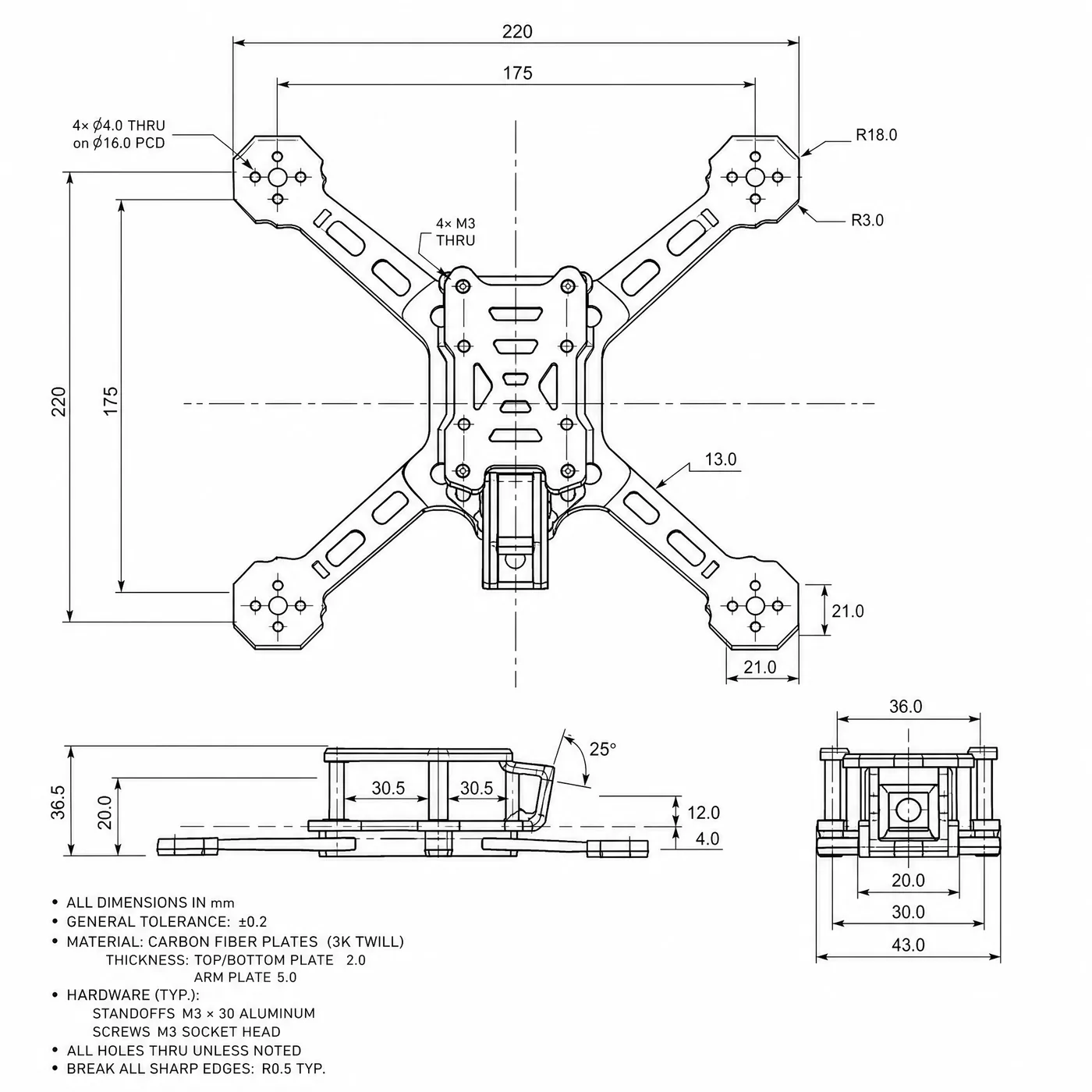
Prompt idea: True X quadcopter frame, 220 mm wheelbase, carbon plates, four motor mounts with 16 x 16 mm M3 holes, 30.5 mm flight stack, camera cage; dimensioned top view, side view and notes. Your result will differ.
Free frame planner
Drone frame design planner: props, arms and holes
Change any input and the plate redraws: wheelbase, prop discs, arm slots, motor pads and the stack pattern. Download the drone frame drawing as a sheet, or the true size cut file for a CNC shop. It all runs in your browser and nothing is uploaded.
Layout
Props
Smallest for these props: 197 mm (tips only), 215 mm (props also off the plate).
Arms and plate
Hardware
- Wheelbase
- 215 mm
- Motor spacing
- 152 mm
- Prop tip gap
- 25 mm
- Prop to plate
- 0.4 mm
- Prop
- Ø127 mm
- Free arm
- 71.3 mm
- Plate size
- 182.9 × 182.9
- Plate mass, est.
- 66.4 g
Mass: carbon at 1.55 g/cm³, bottom plate only. Check motor and stack holes against your parts before cutting.
Examples
Drone frame drawing examples
Three sheets made with the planner above, each with its 1:1 cut DXF, next to AI pictures from the generator at the top of the page.
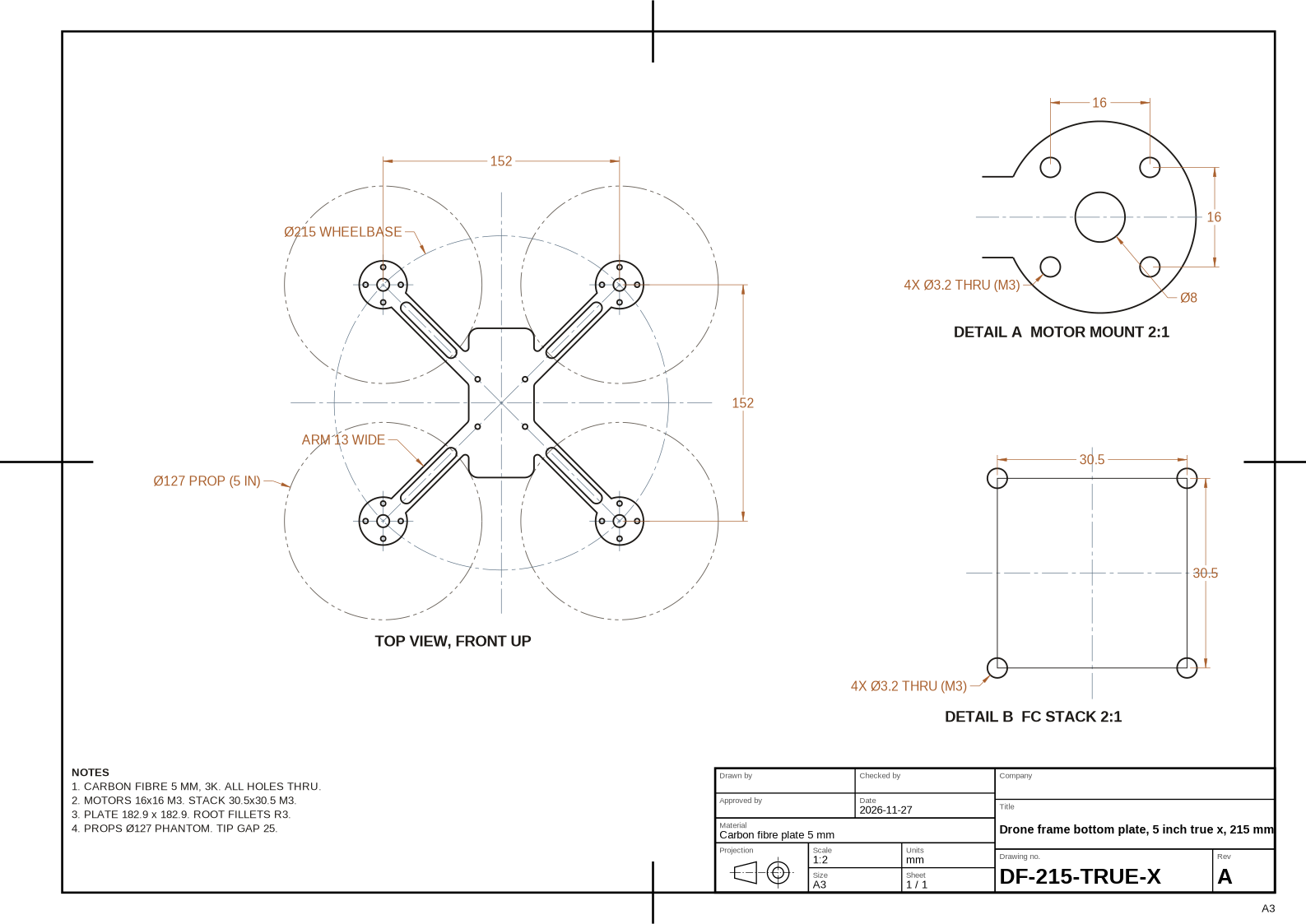
Drawn with the planner
5 inch freestyle true X
A 215 mm one piece plate with 5 mm arms, 16 × 16 motor mounts and a 30.5 stack. The props clear the centre plate and keep 25 mm between tips.
215 mm · 16 × 16 M3 · 30.5 stack · 66 g
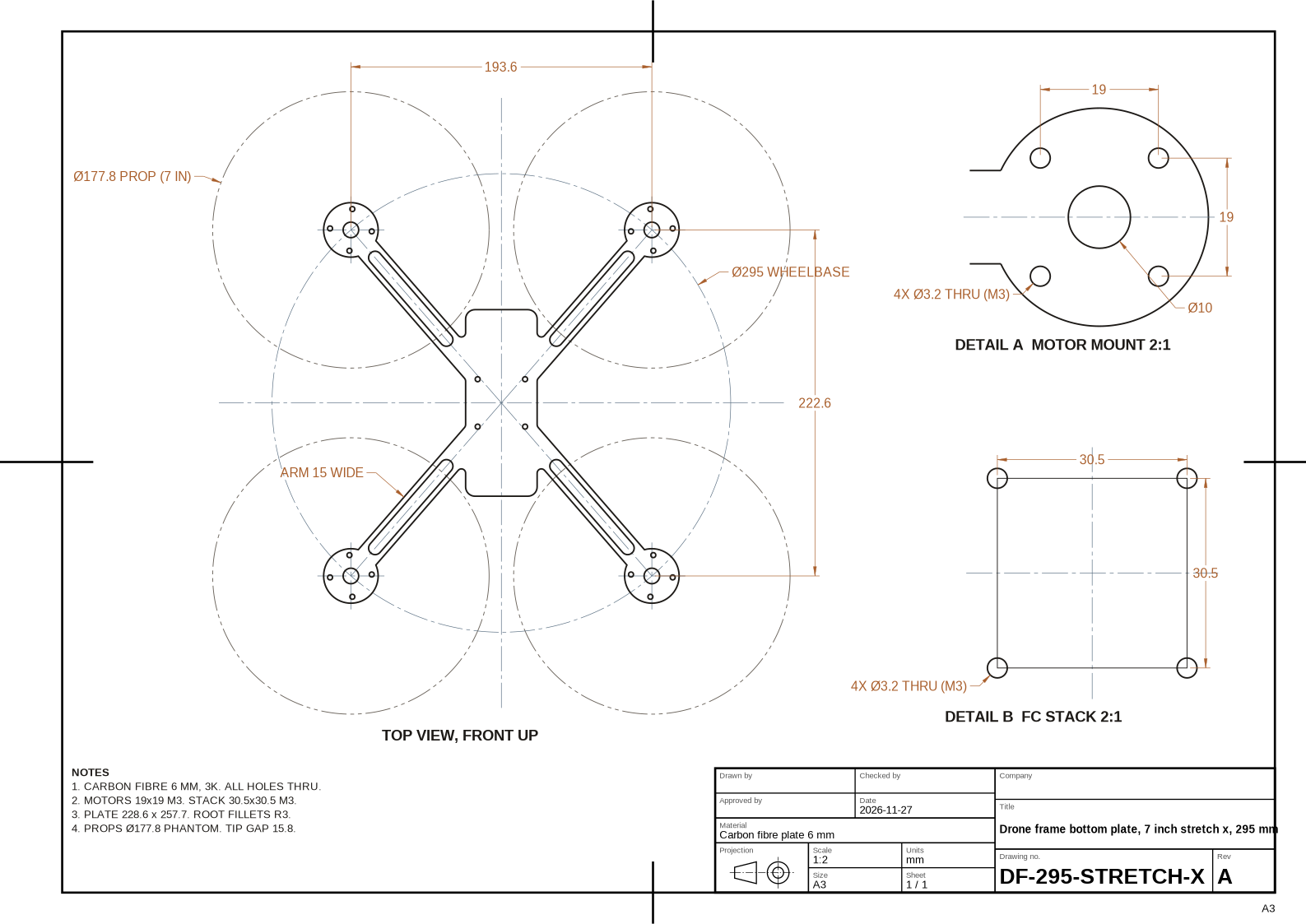
Drawn with the planner
7 inch long range stretch X
A 295 mm stretched X with 6 mm arms and 19 × 19 mounts. The narrow front pair sets the wheelbase, so the frame is longer than it is wide.
295 mm · 19 × 19 M3 · 6 mm arms · 112 g
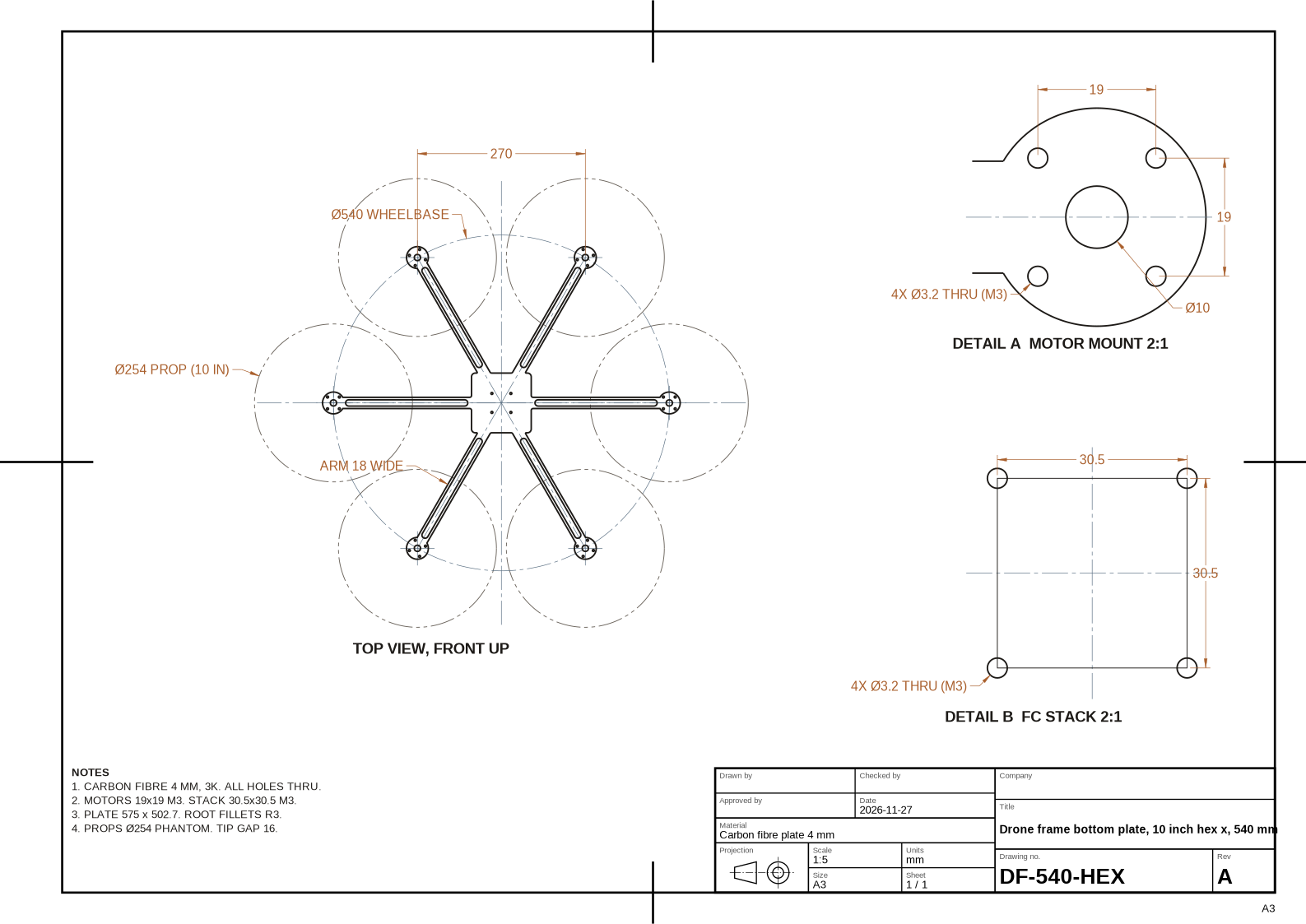
Drawn with the planner
10 inch hex X
Six arms at 60 degrees on a 540 mm wheelbase. On a hex the neighbouring motors sit half the wheelbase apart, which is why hex frames grow fast.
540 mm · 6 arms · 19 × 19 M3 · 153 g
AI-generated example
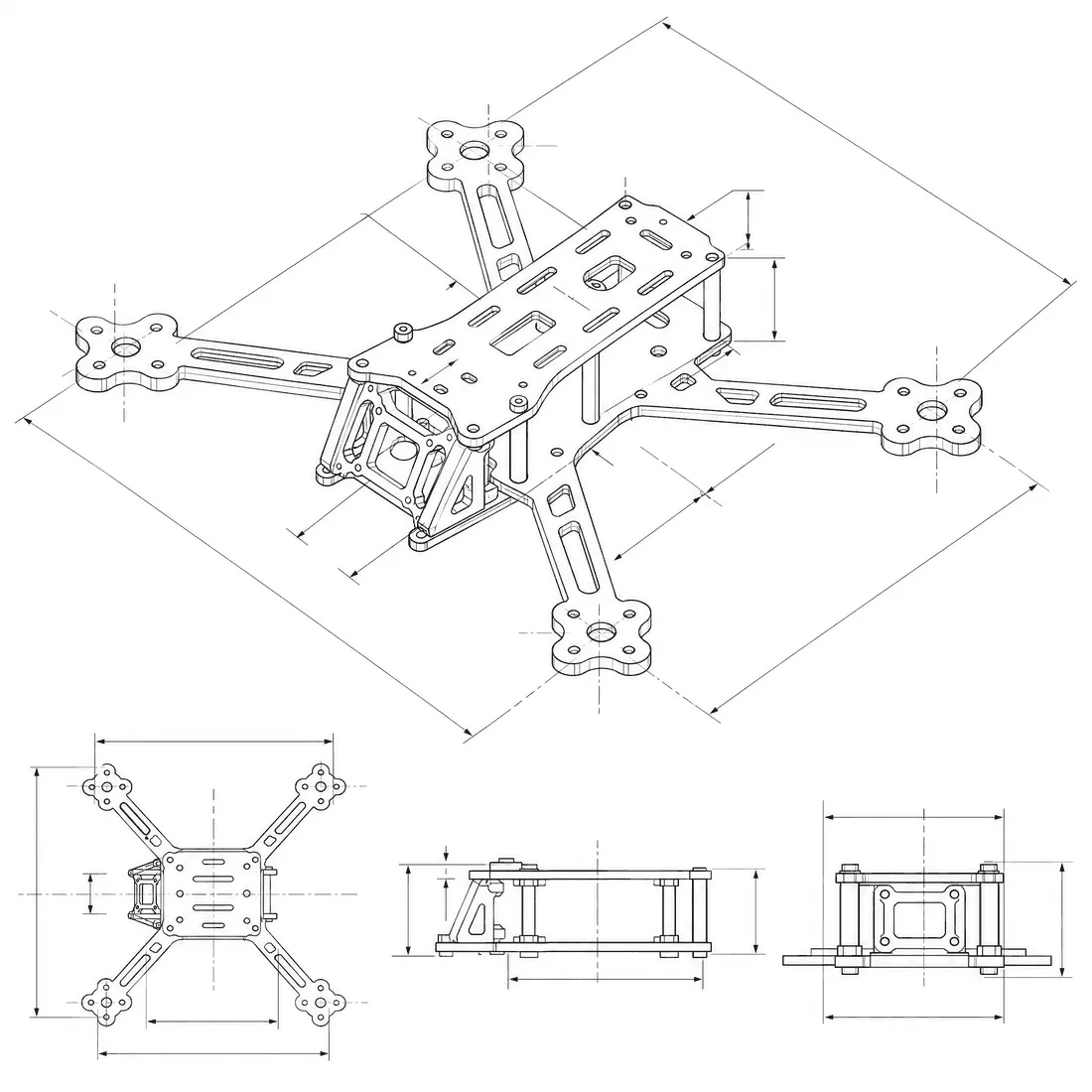
X frame, top view sheet
A technical style picture with a dimensioned top view, a side view and notes. Good for a concept; the numbers are illustrative.
AI-generated example
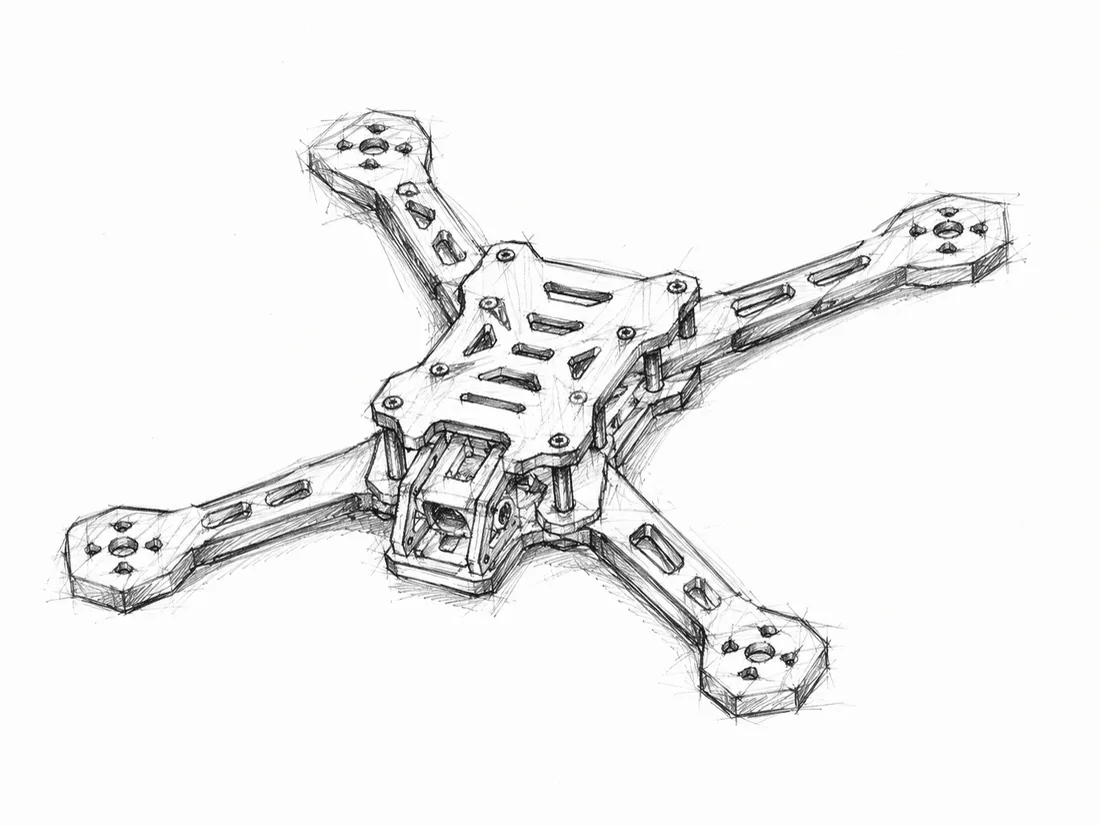
From a pencil sketch
A hand sketch of a quad frame turned into a clean isometric drawing with small views. Drag to compare.
AI-generated example
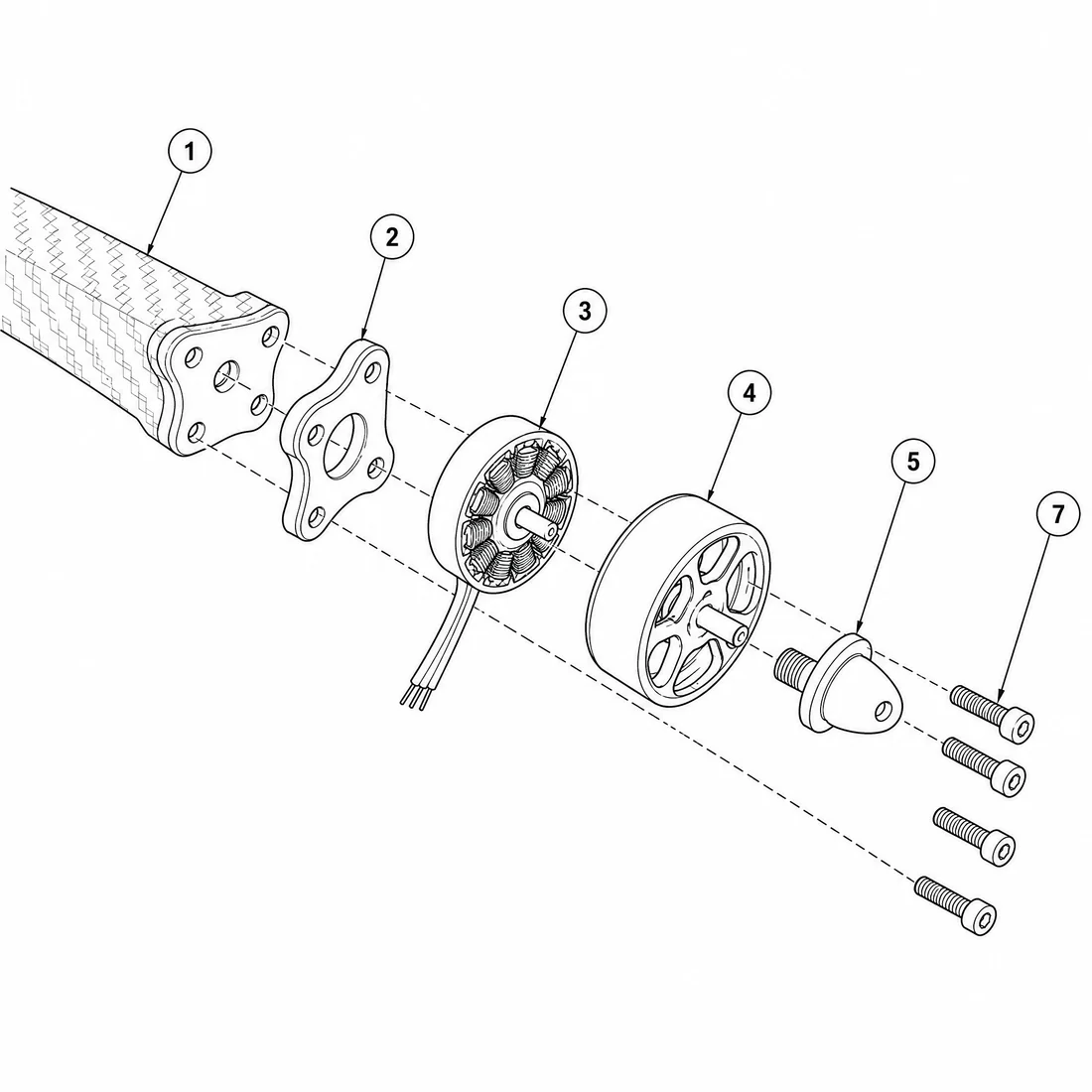
Motor mount, exploded
Arm end, mount plate, stator, bell, prop nut and screws pulled apart along the motor axis, with balloons.
Prompt builder
Describe a drone frame CAD drawing for the AI
Pick a layout, size, construction, holes and views. Apply writes one clear prompt into the generator at the top of the page.
Generated prompt
TechnicalStart from a template
Design rules
Drone frame design rules the planner follows
Five habits behind most good drone frame design. The planner applies them as you type and flags anything that breaks one.
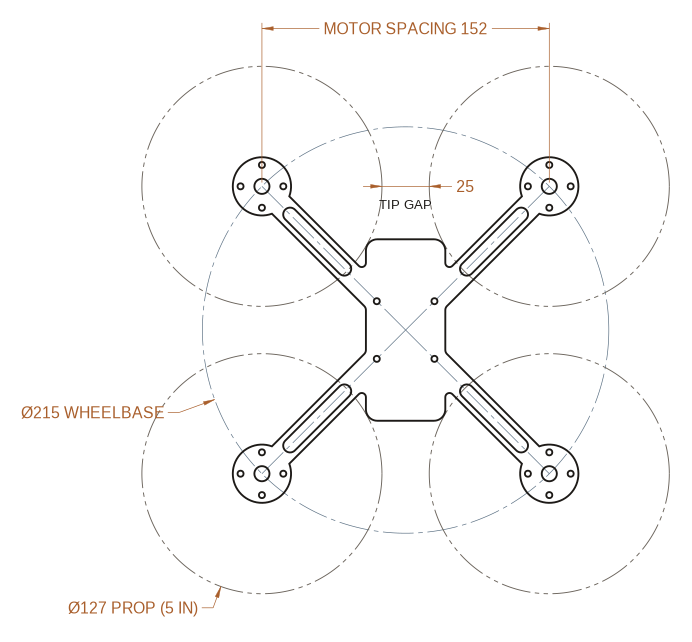
5 inch true X: 152 mm motor spacing, 25 mm tip gap
How to
How to make a drone frame drawing in 3 steps
With the free drone frame design planner; the AI generator at the top works from words or a sketch instead.
STEP 1
Pick props and layout
Choose X, stretch X, H, plus or hex and the prop diameter. Leave the wheelbase on auto, or type your own and watch the tip gap.
STEP 2
Set arms and hardware
Set arm width, plate thickness and the centre plate, then pick the motor bolt pattern and the flight stack. Slots are optional.
STEP 3
Download and cut
Save the sheet as PDF, SVG or DXF for review, and send the 1:1 cut DXF to a CNC router or a carbon cutting service.
Measure your motor
Patterns vary inside one motor size; trust the drawing of the motor you own.
Leave a tip gap
Ten millimetres or more keeps props apart when the arms flex in a crash.
Mind the stack height
If the props sweep over the plate, keep the stack below the prop plane.
Cut with care
Carbon dust is harmful: cut wet or with extraction, and seal the edges.
Two tools
Planner or AI: which drone frame CAD tool to use
The planner is exact about what it draws; the AI is quick at a first picture.
- Planner input
- Layout, prop size, tip gap or wheelbase, arms, plate, motor and stack patterns
- Planner output
- A3 or A4 sheet as SVG, PDF and DXF R12, plus a 1:1 cut DXF in millimetres
- Layouts
- True X, stretch X, H, plus and hex X
- Planner cost
- Free, no account, nothing uploaded
- AI input
- A written description, or a sketch or photo (PNG, JPG or WebP up to 10 MB)
- AI output
- A CAD-style PNG at 1K or 2K, not an editable CAD file
- AI cost
- 60 credits at 1K, 80 at 2K; refunded if a run fails
It does
- Find the smallest wheelbase that clears the props
- Place motor pads, stack holes, slots and root fillets
- Draw a dimensioned top view with two details
- Export a closed 1:1 outline with every hole as a circle
- Draw a first AI picture of a frame from words
It does not
- Check strength, stiffness or vibration
- Draw top plates, standoffs or camera cages yet
- Model folding arms or deadcat sweeps
- Certify a design for flight
- Turn the AI PNG into a cut file by itself
Drone frame design FAQ
Sizes, holes, files and the two tools.
What wheelbase do I need for 5 inch props?
Most 5 inch frames are 210 to 225 mm. With a 12 mm tip gap the props alone need about 197 mm on a true X; keeping them off a 42 mm wide centre plate pushes the planner to 215 mm. Change the plate or the gap and it recalculates.
How is drone frame size measured?
By the wheelbase: the diagonal distance between two opposite motor shafts, in millimetres. All motors sit on one circle of that diameter, which is how the drawing dimensions it.
What is the difference between true X, stretch X and H?
A true X has its motors on a square. A stretch X spreads front and rear motors on a longer rectangle. An H frame has straight side arms on a long body. Deadcat frames sweep the front arms wide to clear the camera view; the planner does not draw those yet, but the AI generator can.
Which motor bolt pattern does my motor use?
Usually 9 × 9 M2 for 11xx, 12 × 12 M2 for 13xx and 14xx, 16 × 16 or 16 × 19 M3 for 22xx and 23xx, and 19 × 19 M3 for 25xx to 28xx. Brands differ, so check the motor drawing.
Should I use a 20 × 20 or a 30.5 × 30.5 stack?
Pick the pattern of the flight controller and ESC you will mount. 30.5 × 30.5 M3 is the classic 5 inch size, 20 × 20 M2 suits smaller frames, and 25.5 × 25.5 M2 is common on whoop boards.
How thick should carbon frame arms be?
As a rough guide, 5 inch freestyle frames often use 5 or 6 mm arms, racing frames 4 to 5 mm, and 3 inch frames about 3 mm. These are habits from frames on the market, not a strength calculation.
Can I send the cut DXF to a CNC shop?
Yes. It is in millimetres at 1:1, with one closed outline, slots as closed loops and every hole as a circle, so CAM software reads it directly. Inside corners take the cutter radius, and the shop sets the tool path.
Can I open the drone frame CAD files in other programs?
Yes. The DXF files are R12 with layers for outline, centre lines, prop discs and dimensions, so they open in AutoCAD, Fusion, FreeCAD, LibreCAD and most CAM tools. The SVG and PDF print to scale.
Does the planner check strength or flight?
No. It checks geometry: prop clearance, hole positions and plate edges. Stiffness, vibration, crash loads and flight behaviour need testing or analysis. Treat every drone frame design here as a drawing to review, not a certified part.
What does the AI drone frame drawing generator make?
A CAD-style PNG of a frame from your words or a sketch, at 60 credits for 1K or 80 for 2K. The dimensions on it are illustrative, and Convert to DXF traces its lines for free, not to scale.
Is this drone frame design tool free?
The planner, the sheet, the cut DXF and the trace to DXF are free with no account. Only AI pictures use credits, and a failed run is refunded automatically.
Does anything leave my computer?
Not with the planner: the geometry, the drawing and the files are made in your browser. The AI generator sends your prompt or image to the image model to draw the picture.
Start your drone frame design
Plan a drone frame drawing free with real holes and a cut file, or describe the frame and let AI draw a first picture.
Describe a drone frame